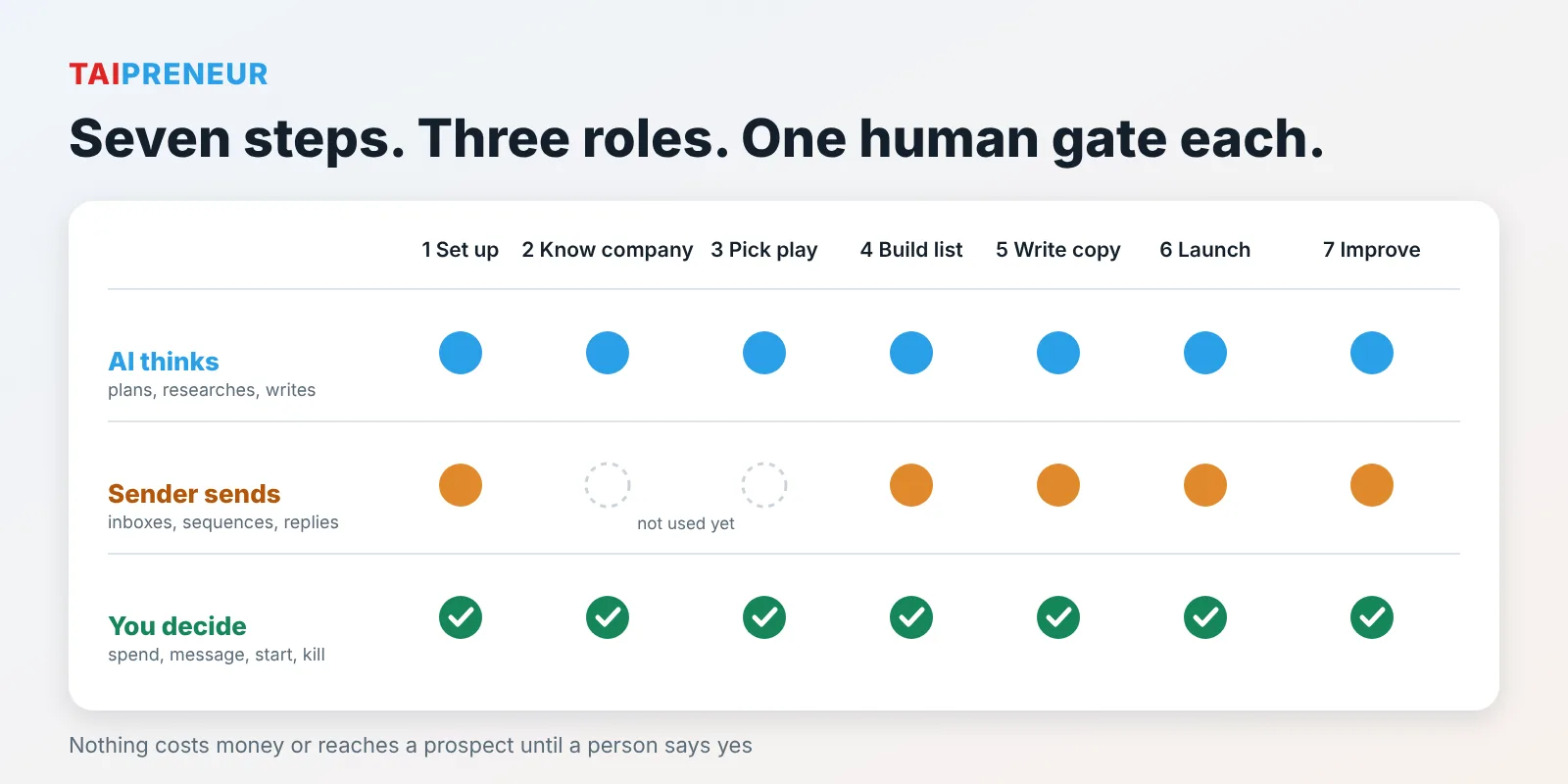
AI-run cold outbound is a seven-step chain: set up sending domains and inboxes, write a company brief, pick a campaign idea, build and verify a scored list, write and check the copy, launch as a draft, then review results every morning. The AI researches and writes, a sending tool delivers, and a person approves every spend, message and start.
- Most "AI outbound" is a pile of disconnected prompts, sheets and tabs. Results never flow back into the next campaign. The fix is one system where each step hands its work to the next.
- Send from look-alike domains, never your main one. Plan three inboxes per domain and about 30 days of warm-up before the first send.
- Rank 15 to 25 campaign ideas on proof, how uncrowded the angle is and expected pull, then build only the one or two best.
- Every sentence in an email should trace to a real source, and every email should pass a spam-word scan before upload.
- A person always decides four things: spending money, the message, pressing start, and killing or scaling a campaign.
- Small businesses and chess academies can use the same chain for partner outreach, sponsor outreach and parent enquiries, with lighter tools.
This post summarises a webinar on running B2B cold outbound with an AI assistant and a sending tool. It then shows what Taipreneur can set up for a business, and how a chess academy or club-partnership business could use the same chain to grow. Everything here is information, not a promise of results.
Why is most AI outbound just a pile of prompts?
The webinar starts with the problem. A typical setup has one prompt for the copy, one sheet for the list and one tab for the results. Each is built once. The copy never learns which emails got replies. The list never learns which leads bounced. The results tab is read by hand and never feeds the next campaign.
A year earlier, the same team did every step by hand: domains searched on a registrar, research done in a chat window where context got lost between people, old campaign plays reviewed manually, copy written one draft at a time, campaigns created by hand from a checklist, and A/B tests checked every seven days.
Who does what: the AI, the sending tool and you?
The core idea is a clean split of jobs. The AI thinks: it researches, plans, builds the list, writes copy and reads results. The sending tool sends: it runs inboxes, warm-up, sequences and replies. A person decides: money, message, launch.
What are the seven steps, one by one?
Each step below follows the same pattern: what the AI does, what the sending tool does, and what a person approves.
Step 1: Set up the sending domains and inboxes
- AI: suggests sending domains that look like yours (a verb plus the brand, or the brand plus a word), checks they are free, and works out how many mailboxes your volume needs. The plan in the webinar was three inboxes per domain and 30 days of warm-up before the first send.
- Sender: buys the domains and mailboxes, switches warm-up on and tags the mailboxes for the campaign.
- You: approve every purchase before you are charged.
The rule that matters: never send cold email from your main domain. A damaged sending domain is replaceable. Your company's domain is not. Every new domain also needs SPF, DKIM and DMARC records at purchase. These are DNS settings that prove the email is really from you. Google's guidance for bulk senders (over 5,000 messages a day to Gmail) requires them, and asks you to keep spam complaints low, with 0.30% as the line you must never reach (Google email sender guidelines; summary of the figures). Small senders are under that threshold, but the same hygiene protects them.
Step 2: Know the company
- AI: reads the website, case studies, company files, past campaign results and voice notes, then writes a one-page brief where every line names its source. It compares the website with the files and flags where they disagree (for example on company size or regions).
- You: decide which source wins on each disagreement.
The brief covers who the offer is for, what is offered, the guarantees, proof, buyers, the best buyer and the voice. In the webinar, past results showed the best buyers were new heads of sales or marketing in their first 90 days.
Step 3: Pick the play
- AI: turns the brief into 15 to 25 ranked campaign ideas, sizes the market behind each and picks the free offer the call to action is built on.
- Sender: nothing yet. No list, no copy and no sending until the play is picked.
- You: choose which idea runs first.
Ideas run from broad to niche. Each gets a score out of 15 on three things: proof, how uncrowded the angle is, and expected pull. Each idea becomes a card listing who is on the list, what the AI does per lead, what the email says, and the evidence behind the score. In the webinar, two ideas were built from 21: a broad one where the AI writes a sample email for the prospect's own company, and a niche one for new heads of a function, with a matching case study from their industry.
Step 4: Build the list
- AI: scores each account, drops bad fits with a reason, finds the right person and finds and verifies an email.
- Sender: holds the leads with custom fields, skips duplicates and blocked domains, and offers a search and email finder.
- You: approve the scoring model before the full build.
The scoring model in the webinar had five parts:
- Hard exclusions: consumer businesses, government, competing agencies, current clients and open deals.
- Fit, 0 to 100, weighted by revenue, whether a real buyer is reachable, industry, a case study in their industry, geography and headcount.
- Signals (new in role, funding, hiring) lift an account one tier, never lower it.
- Tiers A to D as in the diagram.
- Calibration: every existing client should land in tier A or B. If one does not, the model is wrong. In the webinar this exposed two bugs: partnership titles are not buyers, and "Salesforce" in a job title does not mean "sales".
Emails are verified before upload. Valid addresses go in, catch-all addresses are held for an extra check and invalid ones are dropped. The webinar's lesson: a database gives you scale, the AI finds the fresh signal (such as new appointments in public news, since the database had no start-date filter), and an email finder closes the gap.
Step 5: Write the copy
- AI: writes subject lines, first lines and the full sequence, plus a personal line for every lead from real research, then checks each email against a quality bar.
- Sender: holds the sequence steps, delays, A/B variants and spintax (random word swaps).
- You: approve the copy before a single lead sees it.
Before writing at scale, the webinar compared the shape on one real lead: three subject lines and two voices (lean and warm). Then every sentence in each sample email was traced to a line on the prospect's own website, and a scanner checked 253 banned or risky terms. A word marked BLOCK must be fixed. A word marked REVIEW can stay only with a logged reason. The example: a promotional word in a study name was swapped for a neutral one, while a clinical phrase stayed because it was the actual result.
Two rules were added after review: never turn "can do" into "has done", and if there is no real fact on the site, there is no sample email. Other checks: no em dashes, no links in email 1, and a greeting and signature on every email.
Step 6: Launch
- AI: runs the pre-flight checklist, builds the campaign as a draft (schedule, limits, mailboxes) and sends you a test email first.
- Sender: runs a spam test and saves the campaign as a draft.
- You: press start. Always.
In the demo, two campaigns were created as drafts, then read back from the sending tool to confirm they saved correctly. Each had three emails (day 0, then about 2 and 3 days later), a weekday schedule in the lead's time zone, a cap of 20 new leads per day per campaign, open and click tracking off, and stop-on-reply. Email 2 replied in the same thread and email 3 started a new one.
Step 7: Run and improve
- AI: every morning it recommends kill, stay or scale for each campaign, tags every reply and drafts the answer, then writes a weekly report and suggests the next test.
- Sender: webhooks send each reply to the AI, a master inbox holds the thread and alerts run all day.
- You: approve kills, scales and every reply before it goes.
The webinar switched on a reply webhook into a table, a 50/50 subject-line test on email 1 judged on positive replies, not opens, a Slack channel for positive replies, and a daily 7am check. The first morning report said nothing could be judged because the campaigns were still drafts, with zero sent. It ended: "Report only. Acting on a verdict is a person's call."
How does the AI keep context across clients?
The webinar showed the structure behind the steps. There is one private repository per client, plus three shared ones on top:
| Repository | What it holds |
|---|---|
| Knowledge | Cross-client methods, procedures and playbooks |
| Behaviour | The AI plugin: 126 written skills, 20 commands, 7 phases from setup to operate |
| Registry | Who is a client, signal definitions, the scoring system |
| One per client | Same folders every time: who they are, the company foundation, one folder per campaign, communications (append-only), one file per decision, weekly reporting, assets |
The point: last year people carried the context. Now the AI carries it, and a person decides. Every skill carries its own sign-off points, proof rules and spam checks, so the AI follows a written playbook, not a generic prompt.
Which parts can a small business copy without the heavy setup?
You do not need 126 skills. The transferable parts are cheap:
- Look-alike sending domains and warm-up before any send.
- A one-page brief with sources, kept in one place.
- Ranking ideas on a simple score before building any of them.
- A scoring sheet with hard exclusions and a "does it match our best existing customers" check.
- A fact trace and a spam-word scan on every email.
- A daily kill, stay or scale note, and a rule that one person presses start.
The webinar describes one agency's own system and a demo account with no sends yet. It shares no benchmark results, so treat every step as a method to test, not a promise. Cold email rules differ by country (for example CAN-SPAM in the US and GDPR in Europe), and WhatsApp has its own consent and template rules. Check what applies before you send.
What can Taipreneur help with?
Taipreneur is an AI and automation consultancy. Here is how each step maps to work it can set up, using tools such as n8n, a sending tool like Smartlead, WhatsApp Business API providers, Meta and Google ads tracking and Zoho CRM.
| Step | What Taipreneur can set up |
|---|---|
| 1 Set up | Sending domains, inbox plan, SPF, DKIM, DMARC checks and warm-up schedule |
| 2 Know the company | A sourced one-page brief and a buyer profile from your site, files and past results |
| 3 Pick the play | 15 to 25 campaign ideas scored on proof, crowding and pull, and the free offer to lead with |
| 4 Build the list | Scoring sheet, tiers, verified contacts and a "who to skip, and why" log |
| 5 Write the copy | Sequences with a fact trace, a spam-word scan and a personal line per lead |
| 6 Launch | Draft campaigns, a pre-flight checklist and a test send. You press start |
| 7 Run and improve | Daily kill, stay or scale note, reply tagging and a weekly report |
Beyond outbound, the same approach covers the rest of the enquiry path: instant WhatsApp replies and follow-up that stops when someone says no, lead capture into a CRM, sending enrolment or sale results back to Meta and Google so ads find more of the right people, and a site that is easy for search engines and AI assistants to read (SEO, GEO and AEO). Examples by sector: education and real estate. If you are choosing between agencies, use the 20-point scorecard.
How could a chess academy or club-partnership business use this?
A chess academy that grows through clubs, schools, coaches and sponsors has the same shape of problem: many possible partners, a small number worth a personal message, and parents who enquire and then go quiet. These are example plays, not results. Score each one on the 15-point method before building it.
| Audience | Example play | Personal line comes from | Human check |
|---|---|---|---|
| Existing chess clubs | Partnership or scholarship offer, free to join | The club's recent tournament or news | Terms are accurate and approved |
| School chess coordinators and PE heads | Free demo session or club starter kit | The school's own chess page or results | Contact adults only, never children |
| Coaches and creators | Content or referral partnership | Their channel or recent post | No promises about audience results |
| Sponsors and grant-makers | One-page brief on use of funds | Their stated focus areas | Every claim traced to a source |
| Tournament organisers | Co-hosted or sponsored events | Their next event listing | Dates and costs confirmed |
| Parents who enquired | Instant WhatsApp reply, trial-class booking, follow-up that stops on "no" | The enquiry itself | Consent and template rules respected |
Three more things help growth on the same system:
- Feedback to ads: send enrolled students back to Meta and Google, so ads optimise for students who join, not just form fills.
- Findability: a plain-text page per program and per city, with fees, age groups and schedule, so search engines and AI assistants can quote it.
- A weekly note: a short blog or email post from real activity (a tournament, a lesson plan, a result), which also gives outreach something real to reference.
Frequently asked questions
Can AI send cold emails without a person?
It can, but the system in the webinar does not. A person approves spend, the copy and the launch, and decides kills and scales. That keeps one bad batch from burning your domains.
Why use separate sending domains?
Cold email carries a risk of complaints and blocks. If it happens on a look-alike domain, you replace that domain. If it happens on your main domain, your normal email can suffer too.
How long before the first email goes out?
The webinar plan was about 30 days of warm-up after buying domains and inboxes. Brief, ideas, list and copy can all be done during that time.
What is SPF, DKIM and DMARC?
Three DNS records that prove an email is really from your domain. SPF lists who may send, DKIM adds a signature and DMARC tells receivers what to do when a check fails.
Why judge an A/B test on positive replies, not opens?
Open tracking is unreliable, and an open is not interest. A positive reply is the outcome you want, so the test should be judged on it.
Does this work for a small local business or academy?
The method does, with lighter tools. Start with one audience, a short list you can personalise by hand, one sending domain and a simple tracking sheet. Add automation once one play works.
Is cold outreach legal in India?
Rules depend on the channel, the recipient and the country. Email, WhatsApp and calls each have their own consent and opt-out rules. Check the rules for every country you send to, and honour any "no" on every channel.
What to do today
Write a one-page brief for your own business: who it is for, what you offer, your proof and your best existing customers, with a source beside each line. That one page is the input to every other step, and it shows quickly where your own website and files disagree.